Before you feel warm, it's already cooling. Before you feel cold, it's already warming. Now… where did I put that remote anyway?
unawair switches the air conditioner connected to your SwitchBot or Nature Remo on and off to match the room temperature. Set an upper and a lower bound; the cloud checks in every 10 minutes and does the rest.
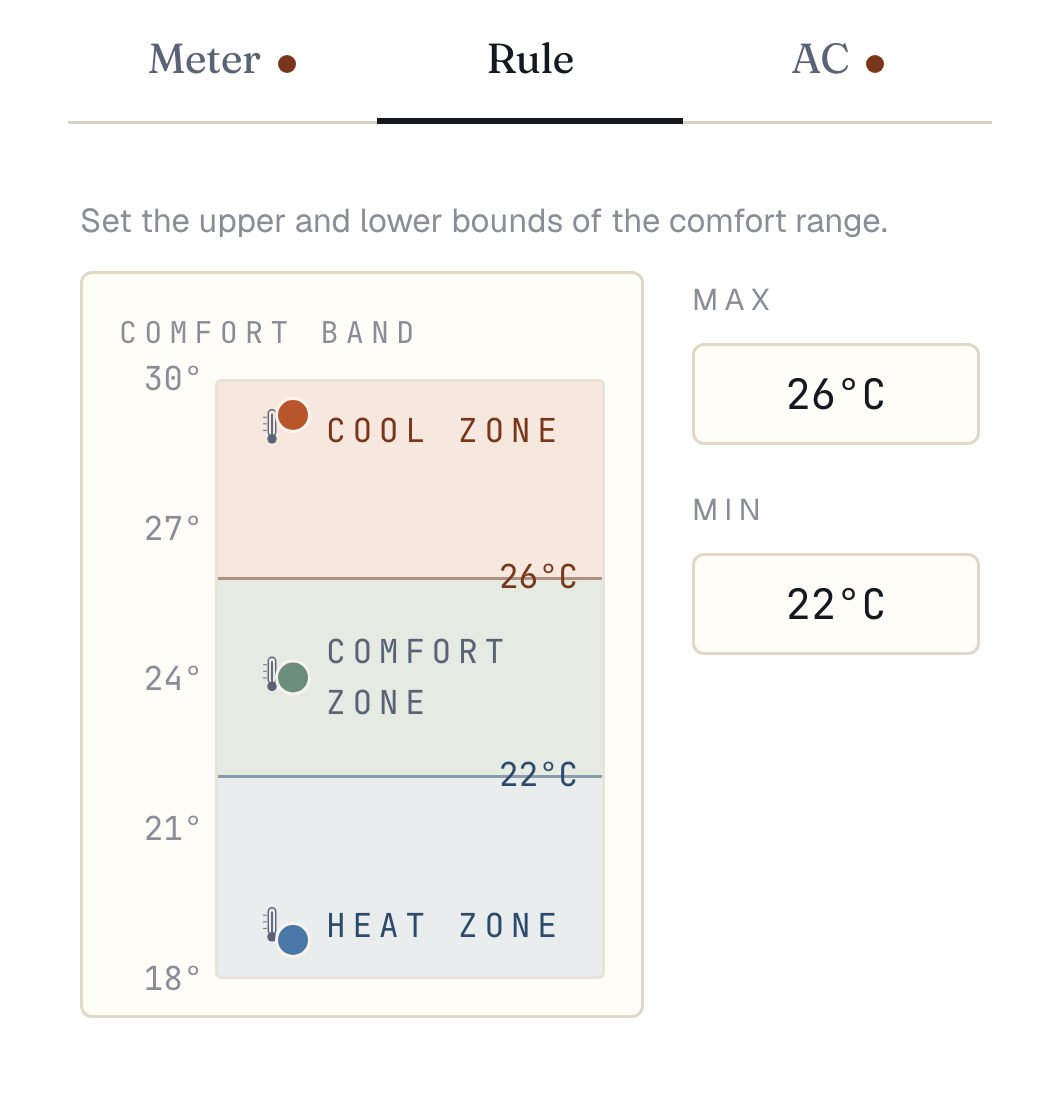
free · no credit cardSet 26°C as the ceiling and 22°C as the floor. When the room drifts toward the edge (grey line), the AC is used to push it back inside (blue line).
getting started
Three things, and you're running.
01
Have a SwitchBot or Nature Remo
You need a hub that sends infrared to the AC and a sensor that reads the room. A Nature Remo does both in one box; with SwitchBot it's a Hub plus a Meter. Already own either? Use it as is. Models are listed on the Hardware page.
02
Sign up free and paste your token
Create an account with your email, then register the access token issued by the SwitchBot or Nature Remo app. Your devices are pulled in automatically.
03
Pick an upper and a lower bound
Register a room as an area and type in the temperatures you consider comfortable. From then on the room is checked every 10 minutes: drift out and the AC heats or cools, drift back in and it stops.
The smallest setup is one Nature Remo and one AC. unawair reads the temperature and sends commands through the vendor's API. Add more devices and the same chain simply repeats per room or per vendor.
autopilot
Set it, then let go.
Pick an upper and lower bound. Every 10 minutes the room is checked — drift past the range and the AC kicks on; back inside the range and it quietly stops.
seasons
Comfortable, every season.
One temperature range covers the whole year — no switching settings by season. From that single setting, unawair heats when it turns cold and cools when it turns hot, automatically.
bring your own
Use the hardware you already have.
Already on SwitchBot or Nature Remo? Register the access token and you're ready. Starting fresh — check the Hardware page.
the only setting
Two numbers. That's the whole setting.
Enter a maximum and a minimum in the area editor. Above it is the cooling zone, below it the heating zone. Switching between the two, and re-tuning for each season, is unawair's job from here.
such as
central air
Central air, just right.
Drive one whole-house AC from a SwitchBot Hub Mini paired with a couple of SwitchBot Meters — the house-wide average is what the algorithm acts on. The spring-and-autumn dance of "cool? heat? off?" stops being your decision; the comfort range answers.
from afar
For parents far away.
Drop one Nature Remo at their place and unawair watches over them every day — handy for parents who don't always notice heat or cold creeping in.
per room
Per-room comfort.
Place a meter in the living room, study, and bedroom — each area runs on its own comfort range.
always on
If one drops, the other keeps going.
Register the same AC under both SwitchBot and Nature Remo. If either vendor has an outage — or a hub fails — the other takes over and keeps the loop running.
Decide. Hand off. Forget.
Sign up free, hook up your hardware, then start the 14-day free trial. After that, there's nothing left to do but forget.
Solo
¥500/mo
¥5,000/yr· Save 2 months
Automated areas1
Vendor integrations2
Pro
¥980/mo
¥9,800/yr· Save 2 months
Automated areas5
Vendor integrations2
Max
¥2,480/mo
¥24,800/yr· Save 2 months
Automated areas20
Vendor integrations5
Included in all plans
·Manual run to verify behavior
·14-day free trial
Solo
Pro
Max
Price (tax incl.)
¥500/mo
¥5,000/yr· Save 2 months
¥980/mo
¥9,800/yr· Save 2 months
¥2,480/mo
¥24,800/yr· Save 2 months
Automated areas
1
5
20
Vendor integrations
2
2
5
Included in all plans
·Manual run to verify behavior
·14-day free trial
faq
Can I use the hardware I already have?
Any air conditioner that SwitchBot or Nature Remo can drive over infrared works, regardless of brand or model. If the remote is already registered in their app, you need nothing else. See the Hardware page for models.
Does it keep working while I'm out or asleep?
Yes. Decisions and commands run in the cloud every 10 minutes, so nothing depends on your phone being open or anyone being home.
Can it control other appliances?
No. unawair only handles the air conditioner: cooling, heating and stop. Lights, humidifiers and the like are out of scope.
Can I cancel any time?
Yes. Cancel during the 14-day free trial and nothing is charged. After that, you keep your plan until the end of the period you've already paid for. Steps are on the Cancel page.